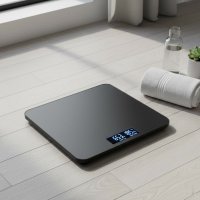
In today’s fast-paced world, understanding your body goes far beyond just the number on a traditional scale. For anyone serious about their health and fitness journey, tracking comprehensive body metrics is essential. The iHome Smart Scale steps into this role, offering a blend of advanced technology and user-friendly design to help you gain deeper insights into your well-being. As a trusted companion for your daily routine, this smart scale empowers you to move beyond simple weight readings and embrace a holistic view of your body composition, all while seamlessly integrating into your digital lifestyle.

What Makes the iHome Smart Scale a Game-Changer?
The iHome Smart Scale isn’t just another bathroom accessory; it’s a sophisticated tool designed to provide a wealth of information at your fingertips. Its core strength lies in its ability to offer a multi-dimensional perspective on your health, making it an invaluable asset for achieving your wellness goals. For expert smart scales reviews on this site.
Beyond Just Weight: Comprehensive Body Composition Analysis
The true power of the iHome Smart Scale comes from its ability to analyze various aspects of your body composition, not just your overall weight. Using Bioelectrical Impedance Analysis (BIA) technology, a mild, safe electrical current passes through your body to measure resistance, which then helps estimate different components.
This smart device typically tracks:
- Weight: Of course, the fundamental metric, displayed clearly and accurately.
- Body Fat Percentage: A crucial indicator of health, distinguishing between lean mass and fat.
- Total Body Water Percentage: Essential for hydration tracking and overall physiological function.
- Muscle Mass: Vital for metabolism, strength, and overall fitness.
- Bone Mass: Provides insights into bone density and skeletal health.
Understanding these metrics allows you to see how your fitness efforts are truly impacting your body, helping you make informed adjustments to your diet and exercise routines. For example, you might see your weight remain stable, but your body fat percentage decrease while muscle mass increases – a clear sign of progress!
Seamless Connectivity with the iHome Health & Fitness App
A truly smart scale needs a smart companion, and the iHome Health & Fitness app fills this role perfectly. Available for both iOS (14 and higher) and Android (8.0 and higher) devices, this intuitive app is the central hub for all your data. The iHome Smart Scale connects via Bluetooth Smart Ready, and some advanced models also offer Wi-Fi connectivity (2.4Ghz) for even greater convenience.
Within the app, you can:
- Track Daily, Weekly, and Monthly Trends: Visualize your progress over time with clear graphs and charts.
- Set Personalized Weight Goals: Stay motivated by establishing targets and monitoring your journey towards them.
- Access Unlimited Online Storage: All your readings are securely stored in the cloud, so you never lose your data.
- Analyze Metrics: Easily swipe through your different body composition metrics to understand their significance and how they relate to your overall health.
This seamless integration transforms raw data into actionable insights, helping you stay on top of your health journey from anywhere.
Precision Engineering for Reliable Readings
|
Our Picks for the Best Smart Scale in 2026
As an Amazon Associate I earn from qualifying purchases.
|
||
| Num | Product | Action |
|---|---|---|
| 1 | Etekcity Upgraded Smart Scale for Body Weight, FSA&HSA Eligible, Bathroom Digital Scale with BMI, Body Fat, Muscle Mass, 13 Metrics with a Large Display, Support Offline Mode and Apps Connection |

|
| 2 | Wyze Scale Ultra, Smart Scale with 4.3\" Color Display, Digital Bathroom Scale for Body Weight BMI Muscle Mass Composition, Wi-Fi & Bluetooth Body Fat Scale with Heart Rate, 400 lbs (Black) |
|
| 3 | Alcedo Smart Body Fat Scale, Digital Scale with BMI, Fat Percentage, Muscle Mass, Color-Changing with Weight Variation, 400 lb, Bluetooth |
|
| 4 | Etekcity Smart Scale for Body Weight, FSA&HSA Eligible, Bathroom Digital Weighing Scale with BMI, Body Fat, Muscle Mass, Accurate Bluetooth Home User Health Equipment Sync Apps |
|
| 5 | WITHINGS Body Smart - Accurate Scale for Body Weight and Fat Percentage, Body Composition Wi-Fi and Bluetooth Weight Scale, Baby Weight Scale, Smart Scale Apple Health Compatible, Bathroom Scale |
|
| 6 | Etekcity FSA&HSA Eligible Smart Scale for Body Weight Fat, Digital Bathroom Weighing Machine for Accurate BMI Muscle Mass Composition, Home Use Apple Health Compatible Fitness Equipment |
|
| 7 | Ovutek Smart Scale for Body Weight, Professional Bathroom Digital Scale with BMI, Body Fat, Muscle Mass, Most Accurate to 0.05lb, Large Display High Accurate Body Composition Machine with Fitness App |
|
| 8 | GE Scale for Body Weight, Body Fat, BMI, Muscle Mass, Smart Bathroom Scales with 14 Body Composition Metrics with Large Display, Accurate Bluetooth Weighing Machine with Fitness App, 400 lbs |
|
| 9 | GE Smart Scale for Body Weight: 8-Electrode Digital Bathroom Scale for Weight Fat BMI Muscle Mass Full Body Composition Analyzer 27 Measurements Bluetooth Highly Accurate Weighing Machine 400lb Black |
|
| 10 | RENPHO Smart Scale for Body Weight, FSA&HSA Eligible, Digital Bathroom Scale BMI Weighing Bluetooth Body Fat Scale, Body Composition Monitor Health Analyzer with Smartphone App, 400 lbs - Elis 1 |
|
Accuracy is paramount when tracking health data, and the iHome Smart Scale is designed with precision in mind. Equipped with four high-sensitivity weight sensors, it boasts a weighing range of 0 to 397 pounds (0-180 kg) with an impressive accuracy of ± 0.67 lbs. This ensures that you get consistent and dependable readings every time you step on. The scale also offers flexibility, allowing you to choose your preferred unit of measurement: kilograms (kg), pounds (lb), or stone pounds (st lb).
For optimal performance, it’s crucial to place your iHome Smart Scale on a hard, level surface. Uneven flooring, such as thick carpets, can interfere with the sensors and lead to inaccurate measurements.
Sleek Design Meets Everyday Practicality
Beyond its technological prowess, the iHome Smart Scale is also a stylish addition to any bathroom. It features a large, high-strength tempered glass platform that is both durable and easy to clean. The slim, modern design ensures it blends seamlessly into your home décor, without taking up excessive space. A clear, easy-to-read digital display provides instant feedback, making your daily weigh-in a quick and straightforward process.
Powering this smart device are typically three 1.5V Alkaline AAA batteries, which offer an average battery lifetime of an impressive 18 months, reducing the frequency of replacements.
Setting Up Your iHome Smart Scale: A Step-by-Step Guide
Getting started with your iHome Smart Scale is designed to be straightforward, allowing you to begin your health tracking journey with minimal fuss.
- Unbox and Power Up: Carefully unbox your iHome Smart Scale. Locate the battery compartment, usually on the underside, and insert the included (or fresh) AAA batteries according to the polarity markings.
- Download the App: Search for “iHome Health & Fitness” in your smartphone’s app store (Google Play Store for Android or Apple App Store for iOS) and download it.
- Create Your Profile: Open the app and follow the prompts to create your user profile. You’ll typically enter basic information like age, gender, height, and activity level, which helps the scale provide more accurate body composition readings.
- Pair Your Scale: Ensure your phone’s Bluetooth is turned on. Step onto the scale briefly to activate it. Within the iHome Health & Fitness app, navigate to the device pairing section. The app should detect your iHome Smart Scale. Select it to establish the connection. If you have a Wi-Fi model, the app will guide you through connecting it to your home Wi-Fi network.
- Take Your First Measurement: Once paired, step onto the scale barefoot and stand still until your weight and body composition readings appear on the scale’s display and sync to your app. Remember to place the scale on a hard, flat surface for the most accurate results.
Maximizing Your Health Insights with the iHome Smart Scale App
The iHome Health & Fitness app is more than just a data repository; it’s a powerful tool for interpreting your progress and making meaningful health decisions.
- Tracking Trends Over Time: Don’t get fixated on daily fluctuations. The app excels at showing long-term trends. Pay attention to the weekly and monthly graphs to see consistent patterns in your weight, body fat, and muscle mass. This helps you understand the effectiveness of your health regimen.
- Interpreting Body Composition Data: The app often provides explanations or ranges for each metric, helping you understand what your body fat percentage or muscle mass means for your age and gender. Use this information to gauge if you’re in a healthy range and where you might need to focus your efforts.
- Using Goal-Setting Features Effectively: Set realistic and achievable goals within the app. Whether it’s to reduce body fat, increase muscle, or simply maintain a healthy weight, having a target provides motivation. The app’s trend tracking will show you how close you are to hitting your targets.
For a deeper understanding of what each body composition metric means and how to use this data for personalized health planning, explore our comprehensive guides on body composition metrics available on Zhoez.com.
Addressing Common Questions and Optimizing Accuracy
Even with advanced technology, smart scales can sometimes present quirks. Here’s how to address common concerns and ensure you’re getting the most accurate data from your iHome Smart Scale.
Why are my readings inconsistent?
Inconsistent readings are often a common concern for users. The most frequent culprits are:
- Surface Level: Ensure your iHome Smart Scale is always on a hard, perfectly level surface. Moving it, even slightly, or placing it on an uneven floor can significantly affect readings.
- Time of Day: Your weight naturally fluctuates throughout the day due to hydration, food intake, and other factors. For the most consistent tracking, weigh yourself at the same time each day, ideally first thing in the morning after using the restroom and before eating or drinking.
- Re-stepping: Some digital scales, including some iHome models, benefit from a “calibration step.” If you notice a slightly higher first reading, step off and then immediately back on. Often, the second reading will be more consistent.
How to ensure the best connectivity?
If your iHome Smart Scale is struggling to connect or sync data:
- Bluetooth/Wi-Fi On: Double-check that Bluetooth is enabled on your smartphone and, if it’s a Wi-Fi model, that your scale is connected to your 2.4Ghz Wi-Fi network.
- App Permissions: Ensure the iHome Health & Fitness app has the necessary permissions (e.g., Bluetooth, location services) on your phone.
- Proximity: Keep your smartphone close to the scale during the syncing process, especially for Bluetooth connections.
- App Restart: Sometimes, simply closing and restarting the app can resolve minor connectivity glitches.
Can multiple users use it?
Yes, the iHome Health & Fitness app typically supports multiple user profiles. Each family member can create their own profile within the app, and the iHome Smart Scale is designed to intelligently recognize and sync data to the correct user profile based on individual weight patterns, or allow you to manually select your profile in the app. This makes it a great health tool for the entire household.
“The iHome Smart Scale acts as a daily health dashboard, providing the immediate feedback needed to stay accountable. Its ability to track subtle body composition shifts helps users understand true progress beyond just weight loss, which is crucial for sustainable health habits,” says Dr. Elena Petrova, a leading health technology analyst at Zhoez.com.
Is the iHome Smart Scale Right for You? Pros and Cons
Considering a smart scale is a significant step towards proactive health management. Here’s a balanced look at the iHome Smart Scale to help you decide.
Pros:
- Affordability: Often positioned as a cost-effective option, the iHome Smart Scale provides a comprehensive suite of features at a reasonable price point compared to some competitors.
- Comprehensive Metrics: It offers detailed body composition analysis (weight, body fat, muscle mass, water, bone mass), giving you a holistic view of your health.
- User-Friendly App: The iHome Health & Fitness app is intuitive for tracking trends, setting goals, and storing data indefinitely.
- Sleek and Modern Design: Its tempered glass platform and slim profile make it an attractive and space-saving addition to any bathroom.
- Easy to Use (mostly): For many users, the setup and daily use are straightforward, providing a hassle-free experience.
Cons:
- Potential Setup Difficulties for Some: While generally easy, some users have reported initial challenges with app pairing or connectivity, particularly if not following instructions precisely.
- Surface Sensitivity: Like most smart scales, its accuracy can be highly dependent on being placed on a perfectly flat, hard surface.
- Initial Reading Inconsistencies: A few users note that the very first reading after moving the scale or stepping on it can sometimes differ slightly from subsequent, more consistent readings.
Frequently Asked Questions (FAQ)
How accurate is the iHome Smart Scale?
The iHome Smart Scale is designed with four high-precision sensors and offers an accuracy of ± 0.67 lbs (approximately 0.3 kg). For the most consistent and accurate readings, ensure it’s placed on a hard, level surface, and weigh yourself at the same time daily.
What body metrics does the iHome Smart Scale track?
Beyond just body weight, the iHome Smart Scale tracks comprehensive body composition metrics including body fat percentage, total body water percentage, muscle mass, and bone mass, utilizing Bioelectrical Impedance Analysis (BIA) technology.
Is the iHome Health & Fitness app free?
Yes, the iHome Health & Fitness app is typically free to download and use, providing unlimited cloud storage for your health data without additional subscriptions.
Can I use the iHome Smart Scale without the app?
While you can use the iHome Smart Scale to view your weight on its display without connecting to the app, to access the full body composition analysis, track trends, and store data, using the iHome Health & Fitness app is essential.
How often should I weigh myself with a smart scale?
For consistent tracking, it’s recommended to weigh yourself daily, preferably first thing in the morning after using the restroom and before consuming food or drink. This helps capture regular patterns and minimizes daily fluctuations.
What are the power requirements for the iHome Smart Scale?
Most iHome Smart Scales operate on three 1.5V Alkaline AAA batteries, offering an average battery life of around 18 months.
How do I troubleshoot connectivity issues with my iHome Smart Scale?
Ensure your phone’s Bluetooth is on, the app has necessary permissions, and you are close to the scale. If issues persist, try restarting the app or your phone, and ensure the scale has fresh batteries. For Wi-Fi models, check your 2.4Ghz network connection.
Embark on Your Smarter Health Journey Today
The iHome Smart Scale stands as a testament to how technology can simplify and enrich our pursuit of health. By offering detailed body composition insights, seamless app integration, and a user-friendly experience, it transforms the simple act of weighing yourself into a powerful data collection process. Whether you’re aiming for weight loss, muscle gain, or general wellness, this smart scale provides the critical data points you need to stay informed and motivated. Take the first step towards a more informed and empowered health journey. Explore more smart health insights and tools on Zhoez.com to optimize your path to a healthier you.
Smart home that does not lock you in
Free PDF — protocol compatibility matrix for 30 hubs and devices.